
NewsHardwarePCAuto SRMicrosoftROG Xbox Ally
Microsoft launches Auto SR on Ally handhelds
The feature leaves preview on Ally X and X20; Performance Mode and Auto HDR support are rolling out through Windows updates.
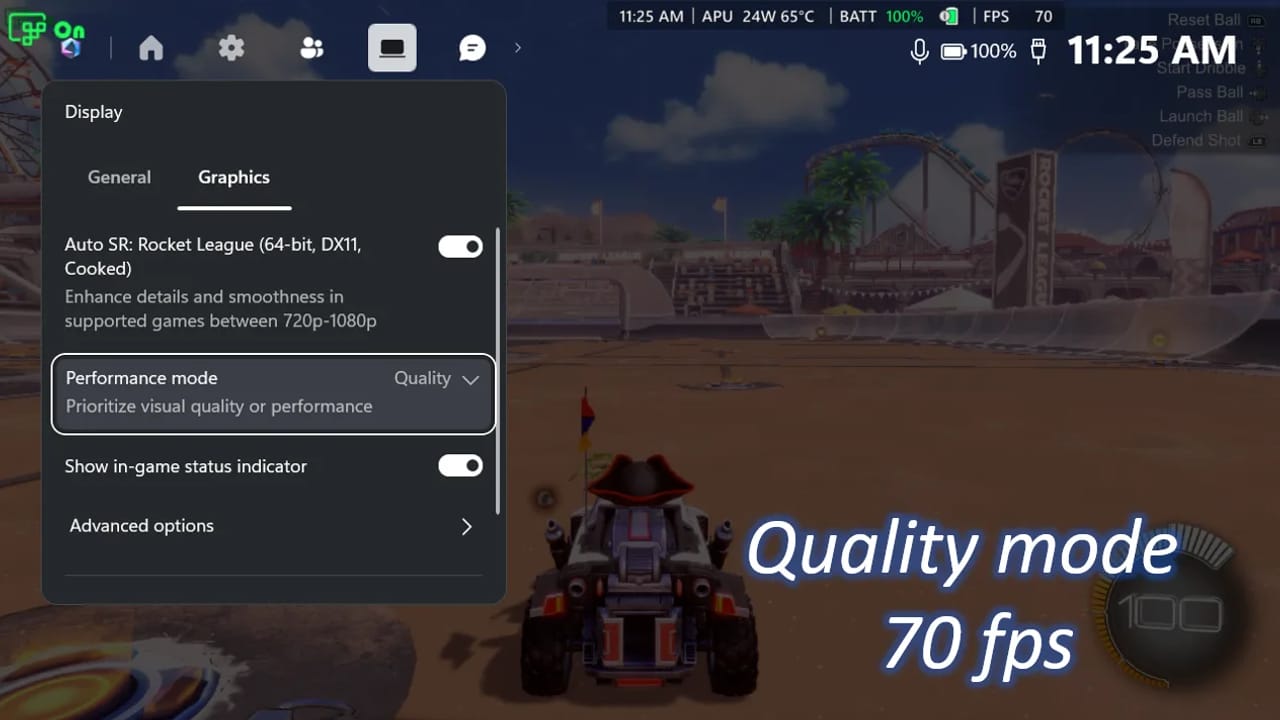
Microsoft has taken Auto SR out of preview on the ROG Xbox Ally X and Ally X20 and expanded it to select AMD Ryzen-powered Copilot+ PCs. The feature improves the image of a game running at a lower resolution as it scales it up for a larger display.
It now works on the built-in screen while running on battery and supports games running at 1080p. A new Performance Mode supports up to 120 frames per second, while compatibility with Auto HDR is also coming through Windows updates. Both are rolling out gradually; the ceiling is not a promise that every game will reach it.
To get started, update Windows 11 and Game Bar, then install or update the Auto Super Resolution package from the Microsoft Store. Open Game Bar and choose Display, then Graphics, from the widgets menu. You can select Quality or Performance when the latter is available.
In Microsoft’s Rocket League demonstration on the Ally X at 720p and high graphics settings, Quality averaged 70 fps and Performance averaged 115 fps. The figures apply to those demonstration conditions.
Source: Microsoft DirectX Developer Blog(opens in a new window)



Comments